Project summary
● Product: Team Files, a file management and collaboration app for Jira and Confluence;
● Audience: Knowledge workers and teams who live in Atlassian tools and rely on cloud storage (Dropbox, SharePoint, etc.);
● Problem: Download, edit, and re-upload workflows created duplicates, wasted time, and made it hard to know which file was the latest version;
● Role: Co-founder and sole designer (UX, UI, branding, UX writing, documentation) from 2018 to 2025;
● Impact: Used by thousands of teams, with an average rating around 3.7/4 stars.
● Audience: Knowledge workers and teams who live in Atlassian tools and rely on cloud storage (Dropbox, SharePoint, etc.);
● Problem: Download, edit, and re-upload workflows created duplicates, wasted time, and made it hard to know which file was the latest version;
● Role: Co-founder and sole designer (UX, UI, branding, UX writing, documentation) from 2018 to 2025;
● Impact: Used by thousands of teams, with an average rating around 3.7/4 stars.
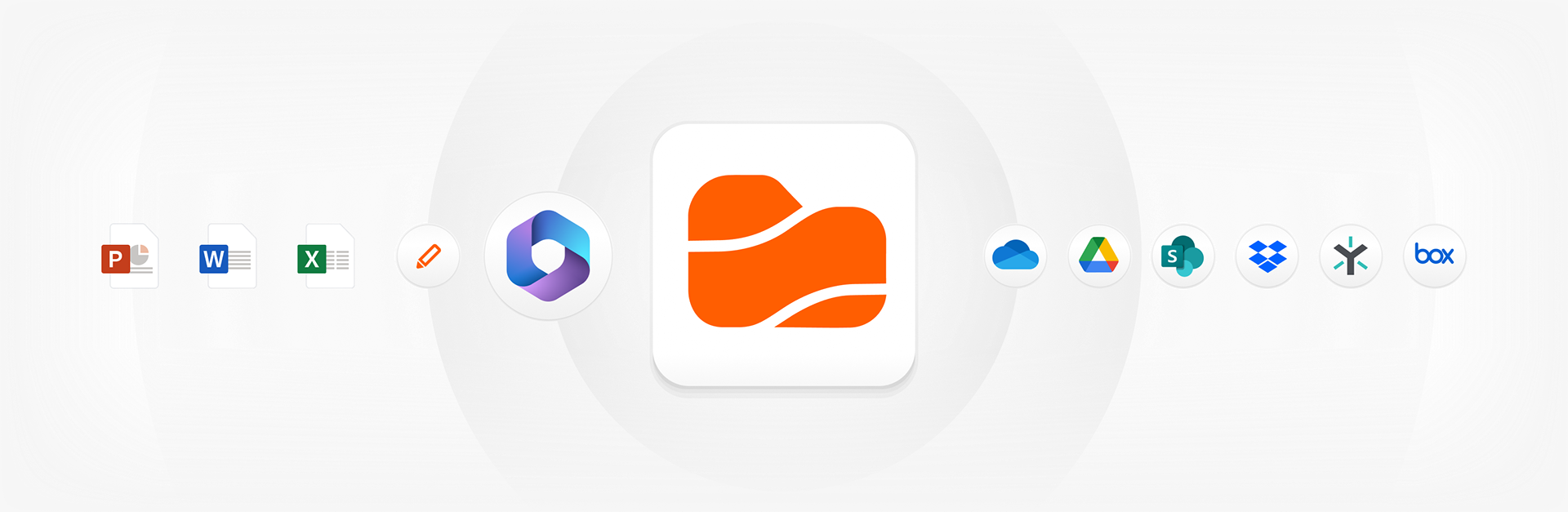
Team Files lets teams collaborate on cloud files right from Confluence and Jira.
Product
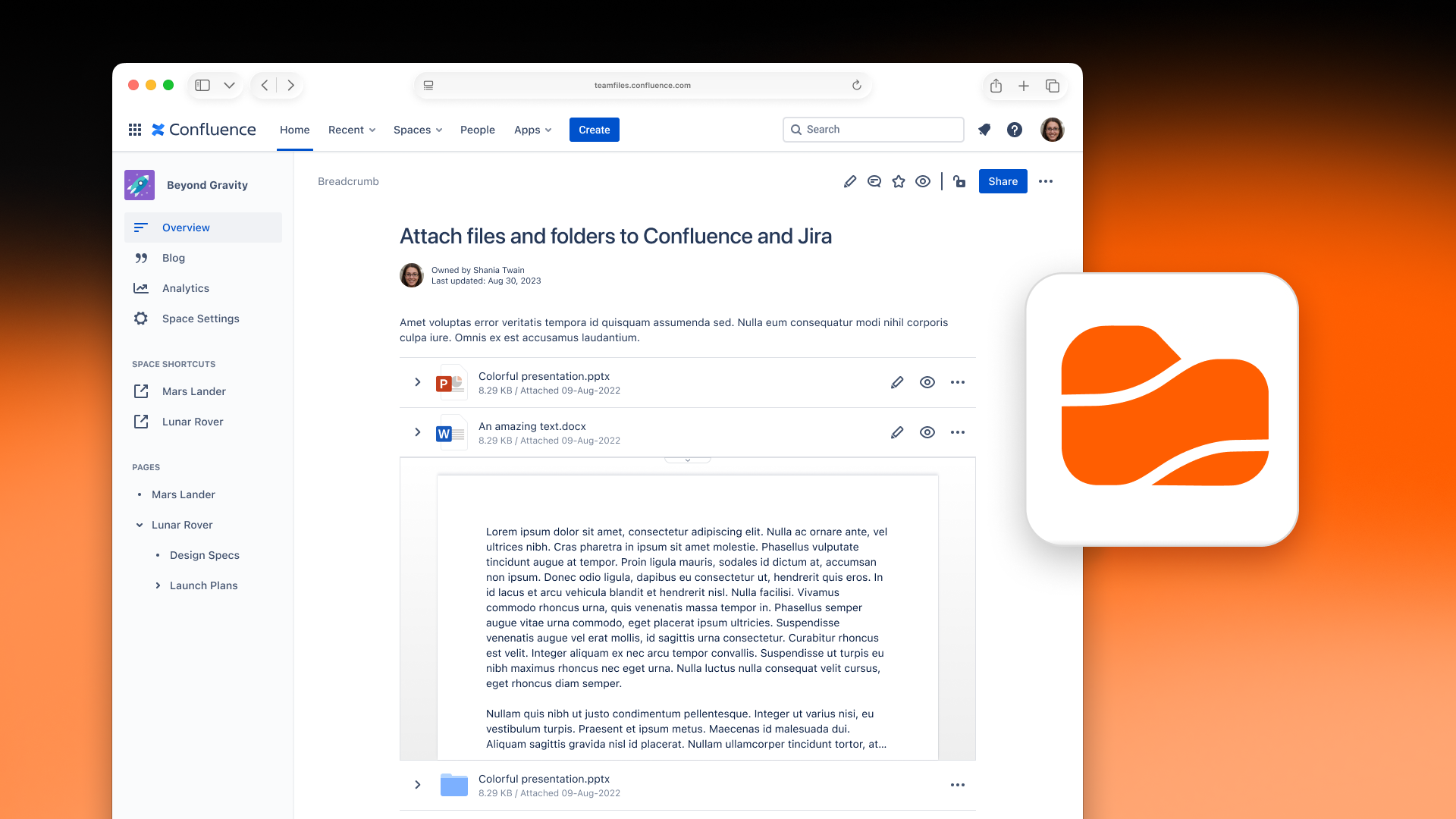
Team Files is an app that connects Jira and Confluence to cloud storage providers like Dropbox and SharePoint, letting teams attach and edit files without creating endless duplicates. Instead of downloading, editing locally, and re-uploading new versions, users can link files and folders directly from their cloud drives and open them with a single click. Updates happen in the original storage, so everyone sees the latest version.
Company
Team Files is made by ikuTeam and sold on the Atlassian Marketplace. It began as a pivot from a previous product, TOPDOX, and shifted from a mobile, single-user focus to a web-based, team collaboration tool built into Atlassian products.
Role
I was one of three founders and the only designer from 2018 to summer 2025. During that time, our team grew to seven people. I handled UX and UI, branding, communication, UX writing, and later, product documentation. As the sole designer, I shaped the product from initial flows and visual identity to the design system, handoff, and ongoing improvements.
Problem & context
Team Files is for knowledge workers in Jira and Confluence, including software teams, support, marketing, operations, and others. The main problem was clear: once someone attached a document to an issue or page, collaboration became a cycle of downloading, editing, and re-uploading, leading to duplicates and version confusion.
Teams were wasting time, cluttering Jira/Confluence with copies, and often losing track of which file was “the latest.” Cloud storage providers already solved collaboration, but the integration with Atlassian tools was weak. Our goal was to bring cloud files into Jira and Confluence in a way that respected how these teams actually worked: one source of truth, one-click access, and no extra friction.
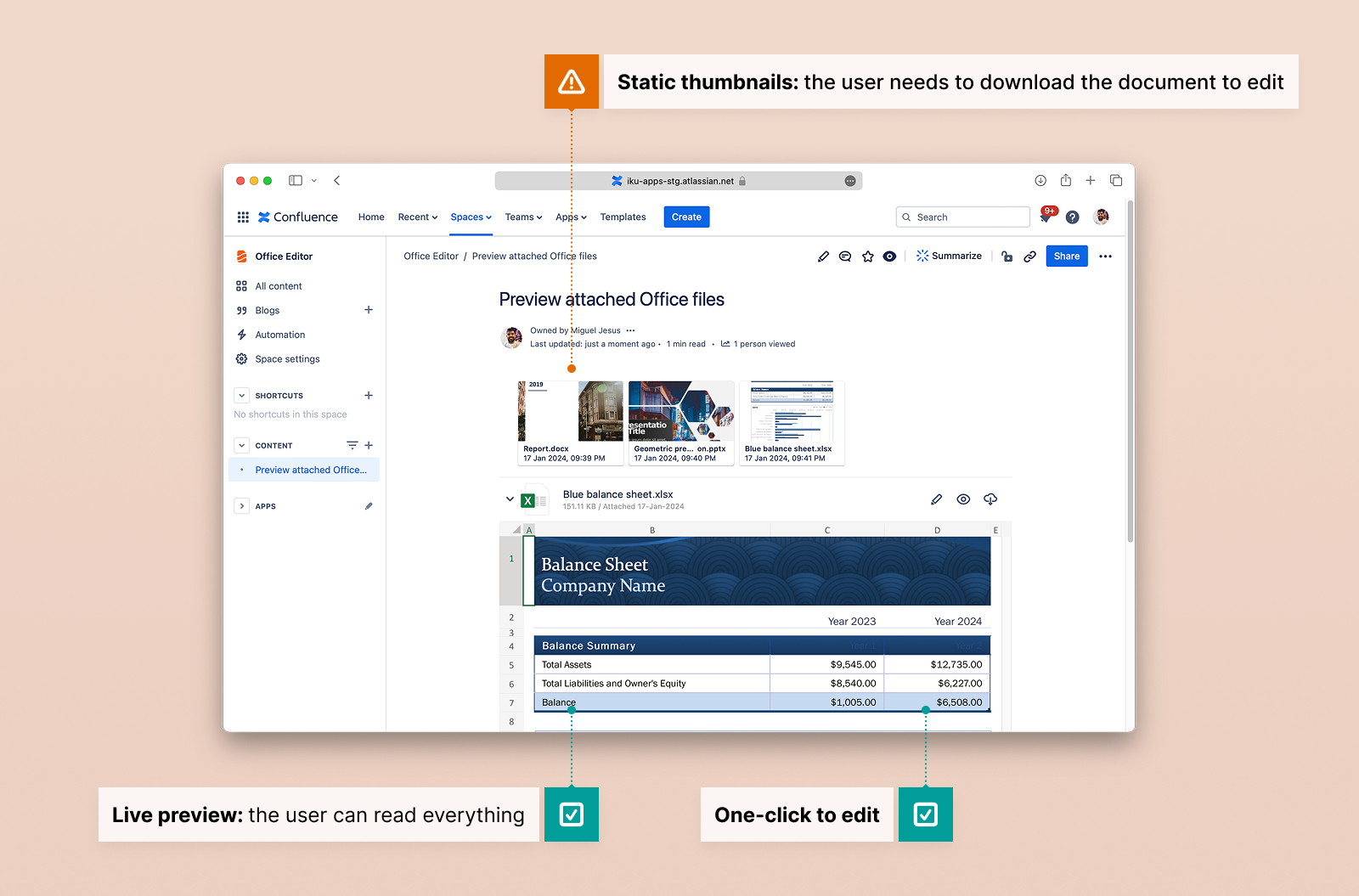
From static thumbnails to usable previews and one-click editing.
Strategy
From the start, our strategy was to do more than just let users paste a link. We aimed to build a deeper integration between Atlassian and cloud drives.
We focused on:
● Making it easy to connect cloud storage accounts and folders to specific projects;
● Allowing users to attach cloud files and folders directly to issues and pages;
● Enabling one-click edit and real-time collaboration, while keeping files in their original storage;
● Evolving the product over time to feel like a native extension of Jira and Confluence, visually and behaviorally.
● Making it easy to connect cloud storage accounts and folders to specific projects;
● Allowing users to attach cloud files and folders directly to issues and pages;
● Enabling one-click edit and real-time collaboration, while keeping files in their original storage;
● Evolving the product over time to feel like a native extension of Jira and Confluence, visually and behaviorally.
As the product matured and the main flows became stable, we shifted from just making it work to making it smooth. We refined wording, empty states, layout options, and settings, and did a thorough UX review in 2023.
Core UX challenges
The biggest challenge was always the core flow: attaching a file in a way that was more powerful than a simple link but still felt straightforward.
For first-time users, there are a few necessary steps:
● Connect a cloud account
● Connect a folder to a project
● Then select files and folders to attach to issues or pages
● Connect a cloud account
● Connect a folder to a project
● Then select files and folders to attach to issues or pages
This setup is powerful but also complex. Over the years, I redesigned this flow many times to simplify the steps, clarify the language, and make the process as clear as possible.
Another turning point was removing mandatory authentication from the app’s first version. This was a big engineering achievement, but it changed the user experience. Without a sign-in flow, we lost a natural chance to guide new users. Since Jira and Confluence admins install the apps, many end users never see store pages or setup info. I had to rethink onboarding, empty states, and in-context explanations to help people understand Team Files the first time they saw it in an issue or page.
We also had to design for narrow spaces, especially in Jira views. This meant carefully planning layouts and prioritizing information so the app stayed usable in both small side panels and wider views.
Design execution
Over seven years, I designed and iterated on all significant flows, including:
● Connecting cloud storage and folders: file manager and connection flows so users could link Dropbox, SharePoint, and others to specific Jira or Confluence projects.
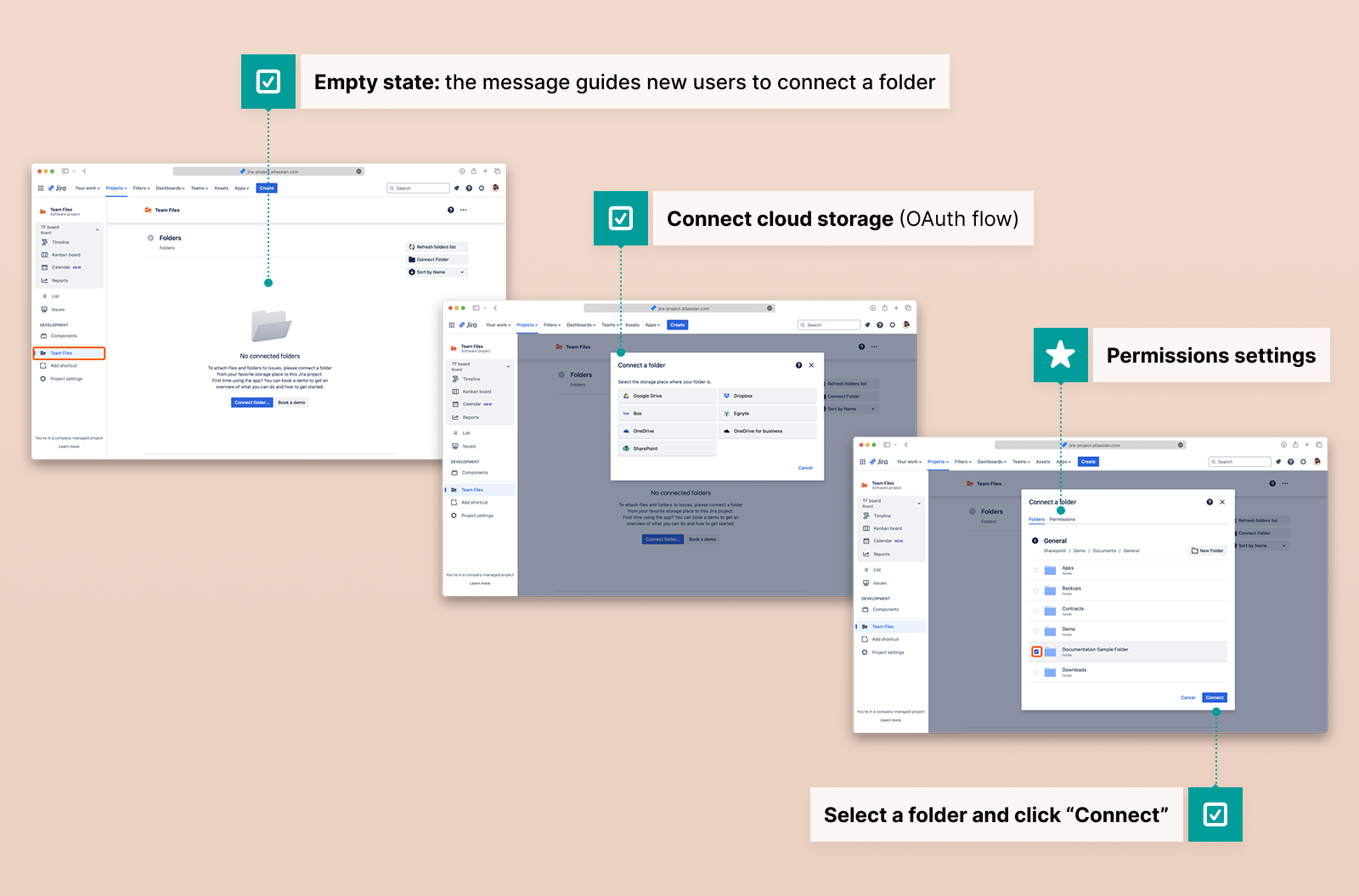
First-time setup: connect cloud storage and link the right folders to projects.
● Attaching files and folders to pages and issues: familiar, consistent UI for browsing storage, selecting items, and showing attached files in a way that matched Atlassian’s design language.
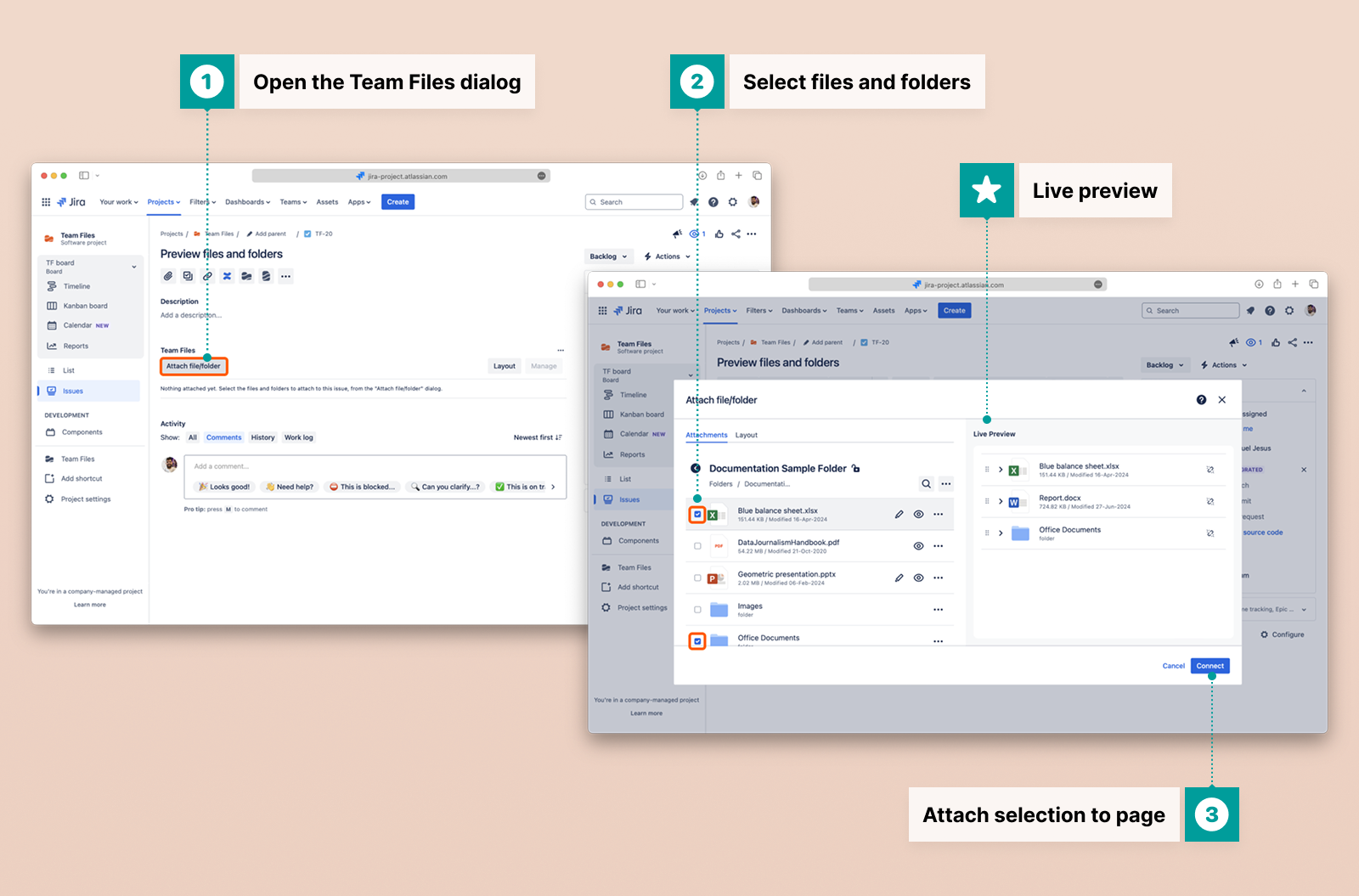
Attach files and folders directly to issues and pages, no more uploads or copies.
● Layout options and customization: layout modes and display options so teams could choose how files appeared in issues and pages, balancing density and readability.
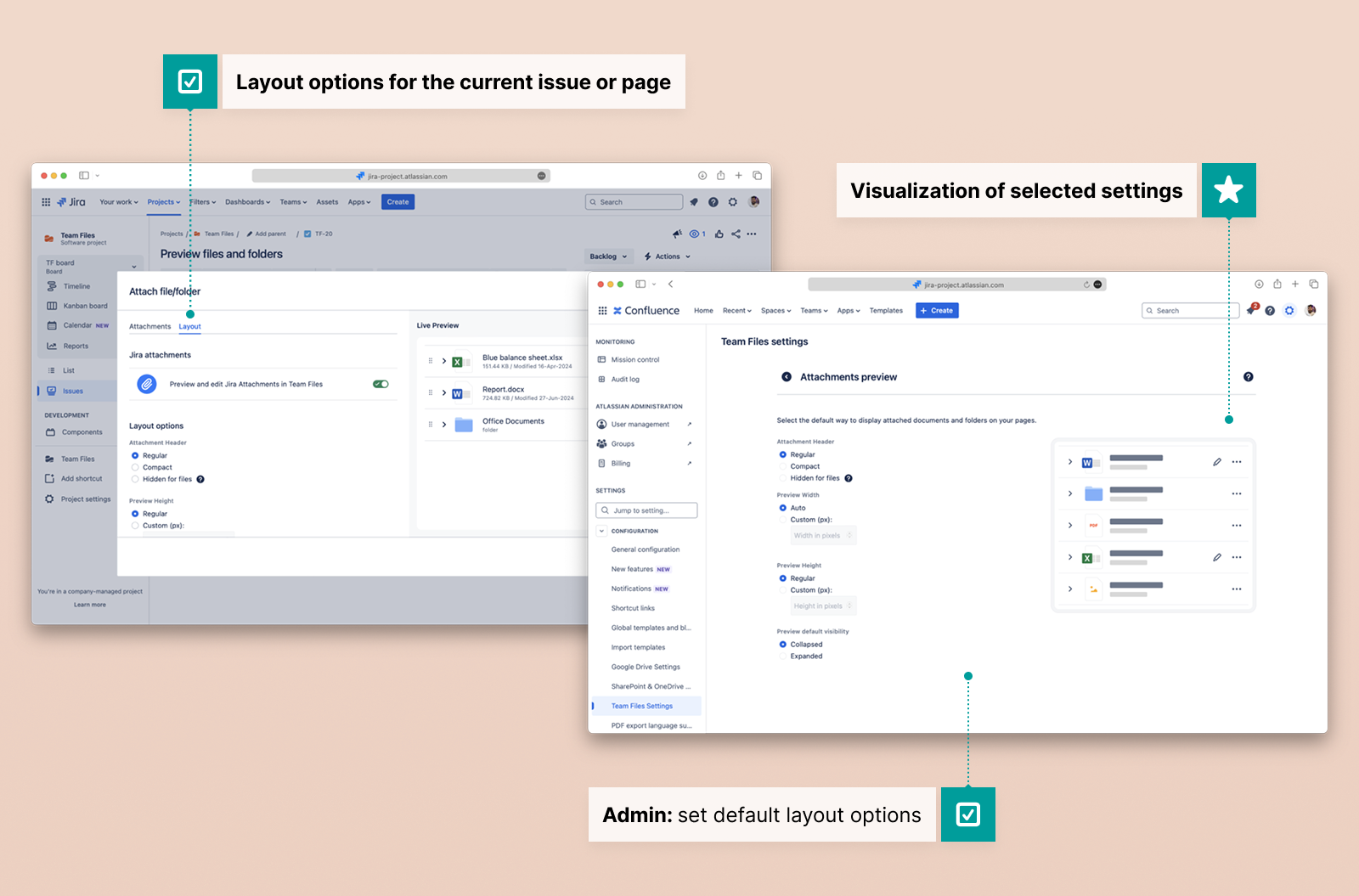
Layout options let teams choose how files appear and Admins can change the defaults.
● Automation and admin settings: designing the setup for automation flows and later reviewing and improving admin settings, including clearer configuration for admins managing multiple projects and storage connections.
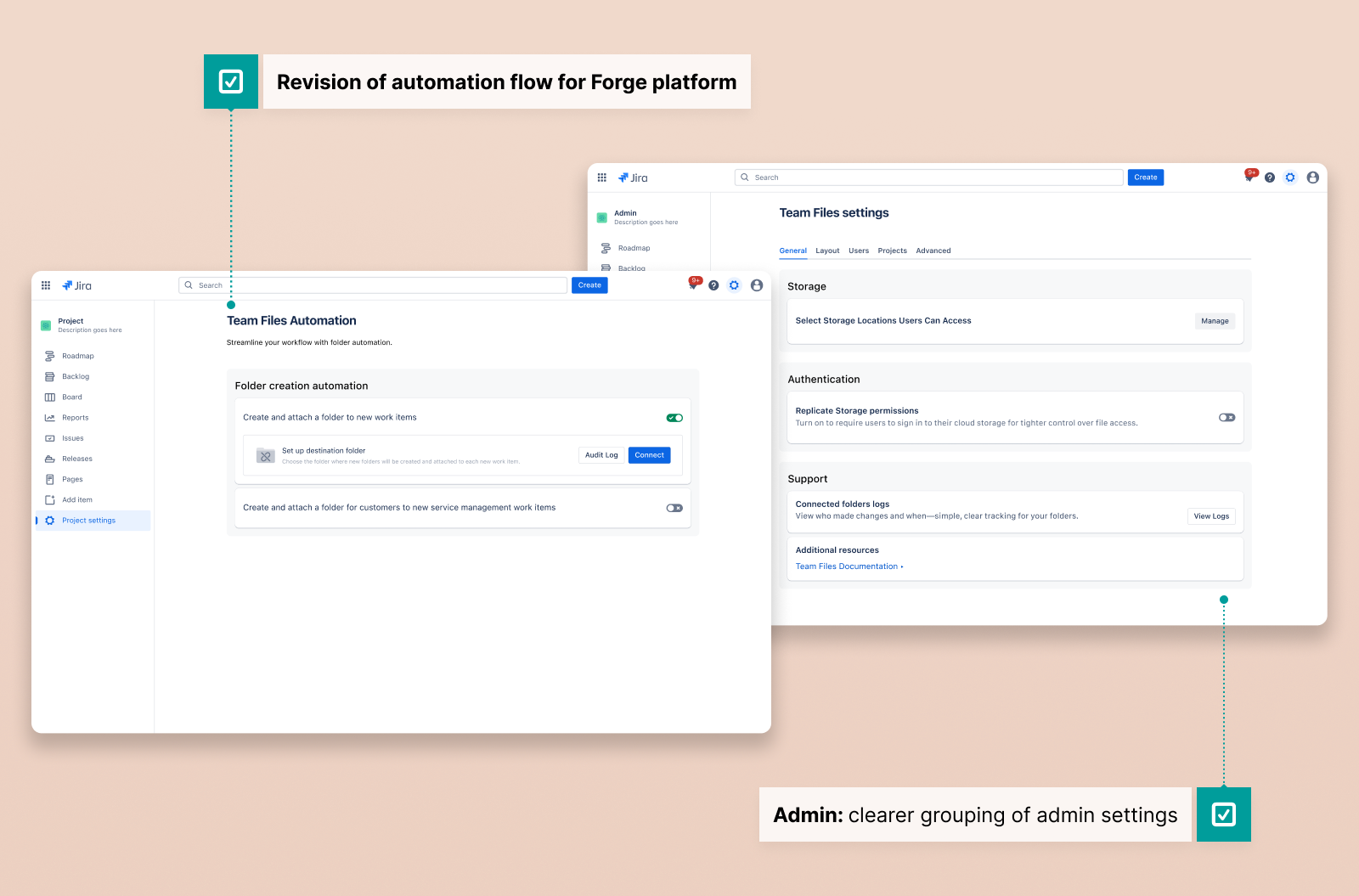
Clear admin settings for managing multiple projects and storage connections.
During this time, I improved my own process. I moved from Sketch to Figma, built a component library using the Atlassian Design System to speed up prototyping, and improved handoffs with interactive prototypes and detailed Jira tickets that also supported user documentation.
Constraints & collaboration
As a founder and solo designer, I defined the visual and brand guidelines for ikuTeam. The brand was kept subtle inside the product. Team Files was meant to feel like a natural part of Jira and Confluence, with productivity and clarity taking priority over strong branding.
We faced real technical constraints. We bootstrapped the project and grew at a steady pace, which sometimes slowed progress but made it more thoughtful. Security needs and browser rules also shaped the user experience. For example, many users wanted to open files in new tabs, but browser security often prevented us from doing so. In those cases, we had to choose between a less-than-ideal interaction and no feature at all, so we carefully designed around those limits.
I worked closely with engineering from the start of each proposal. I preferred open discussion over just handing off designs, checked feasibility early, and adjusted designs when technical limits arose, while still keeping core user experience principles.
Impact & learnings
Team Files launched several years ago and is still actively maintained. Thousands of teams use the app, which has an average rating of about 3.7 out of 4 stars. I contributed for more than seven years, working on many versions and updates.
Key learnings for me included:
● Growing from individual screens to a design system grounded in Atlassian components;
● Improving handoff with interactive prototypes and detailed Jira tickets that also supported better user documentation;
● Acting as a consistent user and accessibility advocate in a small team;
● Combining user feedback and usage data to guide decisions and prioritize improvements;
● Navigating the reality of being a team of one in design, balancing strategic thinking with detailed craft over a long period.
● Improving handoff with interactive prototypes and detailed Jira tickets that also supported better user documentation;
● Acting as a consistent user and accessibility advocate in a small team;
● Combining user feedback and usage data to guide decisions and prioritize improvements;
● Navigating the reality of being a team of one in design, balancing strategic thinking with detailed craft over a long period.